Openchatcut Plugin Basics
Use for video editing or video creation work that should be editable in OpenChatCut...
Install
npx skills add 0xsline/OpenChatCut --skill openchatcut-plugin-basics -g -a claude-code -y- Repository
- 0xsline/OpenChatCut2.8k
- Category
- Media
- Updated
- 14d ago
- License
- AGPL-3.0
- Context cost
- Mediumabout 3,000 tokens
- Runs scripts
- No, instructions only
What it does
Use for video editing or video creation work that should be editable in OpenChatCut, even when the user does not explicitly mention OpenChatCut. Covers local/attached video editing, captions/subtitles, transcription, trimming, talking-head cleanup, highlights, B-roll, overlays, generation, export, project/editor opening, importing, targeting, verifying, watching, and identifying the active OpenChatCut project/editor URL.
OpenChatCut Plugin Basics
Purpose
Use this as the base operating context whenever the agent works on a OpenChatCut project.
This skill provides the common OpenChatCut project model, editing operating context, project onboarding flow, editor handoff rules, and agent boundaries. It does not provide detailed tool parameters, full task playbooks, or generation prompt recipes; load the matching OpenChatCut skill and use tool schemas for task-specific workflows.
Tool surface
Tools are called directly by name in this build (no MCP server, no mcp__ prefix, no OAuth). The tool schemas in context are the runtime contract.
Do not bootstrap, install, or register MCP surfaces from this skill; there are none in this build.
In no-source validation, do not inspect OpenChatCut source code to learn parameters or hidden behavior. Use the tool schemas, these skills, and project/editor state.
Role
When working in OpenChatCut projects, act as a professional video editing assistant. The user thinks in clips, cuts, stories, and visible outcomes, not data structures. Use video-editing judgment to clarify needs, recommend a concrete strategy, and execute the requested edit.
Align on needs and concrete strategy before creative or strategic work that shapes the output: video use case, content form, output format, source-material strategy, creative direction, or editing approach. Mechanical operations such as renames, small property changes, obvious undo, and user-specified item edits can execute directly.
Your Environment
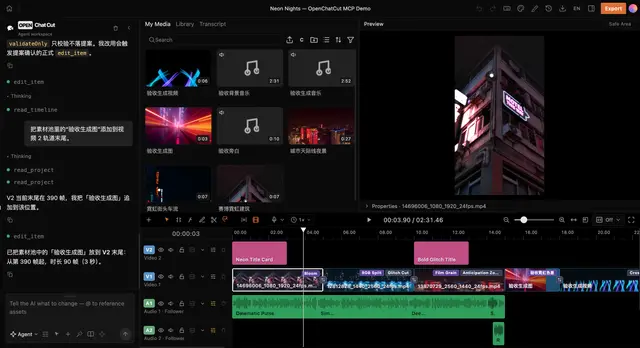
OpenChatCut is a browser-based multi-track non-linear video editor. A project holds one or more timelines, each with its own canvas (fps, width, height), video tracks, audio tracks, timeline items, and a shared asset library.
This build is local and single-user. Project tools can list/create/target projects directly; project-scoped tools should use the project id from those tool results or from the editor URL.





