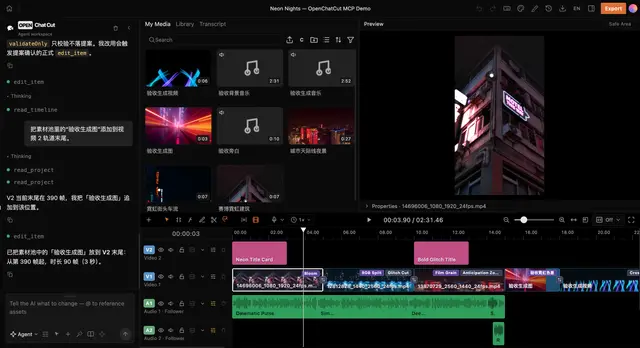
Product Help
OpenChatCut product knowledge, UI layout, editor features, and how generation...
Install
npx skills add 0xsline/OpenChatCut --skill product-help -g -a claude-code -y- Repository
- 0xsline/OpenChatCut2.8k
- Category
- Design
- Updated
- 14d ago
- License
- AGPL-3.0
- Context cost
- Lightabout 426 tokens
- Runs scripts
- No, instructions only
What it does
OpenChatCut product knowledge, UI layout, editor features, and how generation providers are configured. Use when the user asks about the product interface, how to use a feature, where to find something, or needs GUI guidance for something the agent cannot do directly. Also use as fallback when a task fails and the user needs to complete it manually in the UI. NOT for live project-state queries ("where are my folders?", "what's on my timeline?", "where is clip X?"), those are answered by `read_project`, not by this skill.
OpenChatCut Product Help
Product knowledge base for answering user questions and guiding GUI operations.
When to Use
- User asks about the product, a feature, or how something works
- User asks how to configure AI providers / API keys
- User needs to perform a GUI action that the agent cannot do directly
- A task fails and you need to guide the user through manual steps as a fallback
Reference Files
Read the relevant file on demand, do NOT read all files at once.
| Question about | File |
|---|---|
| Product UI, layout, panels, buttons, features | references/ui-and-features.md |
| API keys, providers, which features need a key | references/providers-and-keys.md |
| What generation models/tools are wired | references/generation-capabilities.md |
| Official generation API documentation | references/generation-official-docs.md |
Guidelines
- Try to do it first. If the task is something you can handle (adding captions, changing aspect ratio, etc.), do it. Only guide GUI operations as a fallback.
- Use visible UI names. When guiding manual operations, give clear numbered steps with labels and panel locations that are confirmed in the references. If the user says they cannot find an entry, re-anchor from major visible regions such as the AI panel, top bar, asset/library panels, and timeline.
- Missing keys. If a provider is not configured, say which key is missing and how to set it in Settings.
- Generation confirmations. Some generation tools may show an in-app confirmation (skill guard / proposal) before running.
- Provider costs. If the user asks about cloud cost, point them at their provider dashboard; do not invent rates.





