Build Review Interface
Build a custom browser-based annotation interface tailored to your data for reviewing...
Install
npx skills add ai-evals-course/evals-skills --skill build-review-interface -g -a claude-code -y- Repository
- ai-evals-course/evals-skills1.7k
- Category
- AI and agents
- Updated
- 11d ago
- License
- Apache-2.0
- Context cost
- Lightabout 1,282 tokens
- Runs scripts
- No, instructions only
What it does
Build a custom browser-based annotation interface tailored to your data for reviewing LLM traces and collecting structured feedback. Use when you need to build an annotation tool, review traces, or collect human labels.
Build a Custom Annotation Interface
Overview
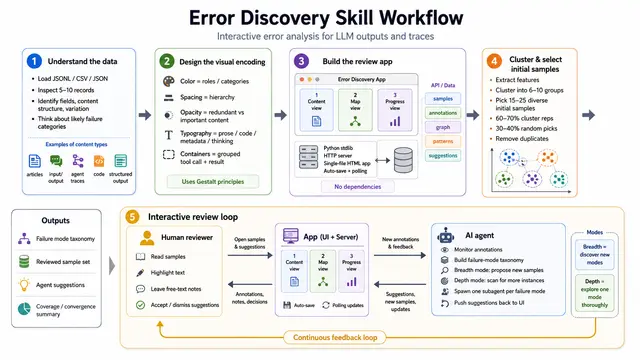
Build an HTML page that loads traces from a data source (JSON/CSV file), displays one trace at a time with Pass/Fail buttons, a free-text notes field, and Next/Previous navigation. Save labels to a local file (CSV/SQLite/JSON). Then customize to the domain using the guidelines below.
Data Display
Format all data in the most human-readable representation for the domain. Emails should look like emails. Code should have syntax highlighting. Markdown should be rendered. Tables should be tables. JSON should be pretty-printed and collapsible.
- Collapse repetitive elements. If every trace shares the same system prompt, put it in a
<details>toggle. - Extract and surface key metadata. If traces contain a property name, client type, or session ID buried in the data, extract it and display it prominently as a header or badge.
- Color-code by role or status. Use left-border colors to distinguish user messages, assistant messages, tool calls, and system prompts at a glance.
- Group related elements visually. Tool calls and their responses should be visually linked (indentation, shared border).
- Collapse what doesn't help judgment. Verbose tool response JSON, intermediate reasoning steps, and debugging context go behind toggles.
- Highlight what matters most. Make the primary content reviewers judge visually dominant. Bold key entities (prices, dates, names). Use font size and spacing to create hierarchy.
- Show the full trace. Include all intermediate steps (tool calls, retrieved context, reasoning), not just the final output. Collapse them by default but keep them accessible.
- Sanitize rendered content. Strip raw HTML from LLM outputs before rendering. Disable images in rendered markdown if they could be tracking pixels.
Feedback Collection
Annotate at the trace level. The reviewer judges the whole trace, not individual spans.




