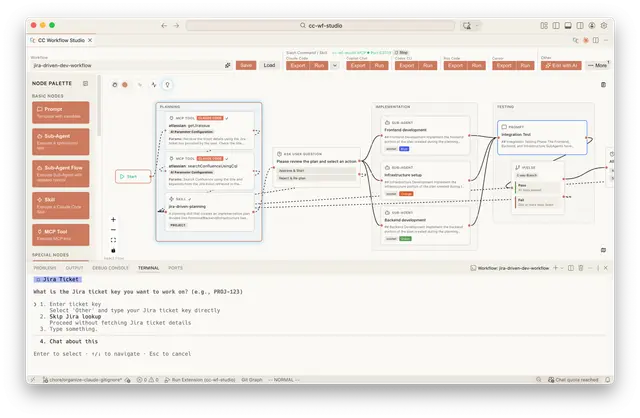
Visual Workflow Editor
Creates and edits visual AI agent workflows through conversation and MCP tools.
Install
npx skills add breaking-brake/cc-wf-studio --skill cc-workflow-ai-editor -g -a claude-code -y- Repository
- breaking-brake/cc-wf-studio5.4k
- Category
- AI and agents
- Updated
- 29d ago
- License
- See repository
- Context cost
- Lightabout 456 tokens
- Runs scripts
- No, instructions only
What it does
AI workflow editor for CC Workflow Studio. Create and edit visual AI agent workflows through interactive conversation using MCP tools (get_workflow_schema, get_current_workflow, apply_workflow, update_nodes). Use when the user wants to create a new workflow, modify an existing workflow, or edit the workflow canvas in CC Workflow Studio via the built-in MCP server.
- Call
get_workflow_schemaviacc-workflow-studioMCP server - Call
get_current_workflowviacc-workflow-studioMCP server - Ask the user what to create or modify
- Generate workflow JSON: use built-in sub-agents (builtInType: explore/plan/general-purpose) by default. Only call
list_available_agentswhen the user explicitly asks to use an existing custom sub-agent. - Apply changes via
cc-workflow-studioMCP server:- New workflow or structural changes (add/remove nodes/connections): use
apply_workflow - Partial updates to existing nodes (change name, position, or data): use
update_nodes(more token-efficient) - Fix errors if any
- New workflow or structural changes (add/remove nodes/connections): use
- Ask for feedback, repeat from step 4
Group Node
Group nodes are visual containers for organizing related nodes on the canvas. They do NOT affect workflow execution.
Rules
- Group nodes have
type: "group"and requiredata.label(display name) - Group nodes must have
style: { width, height }to define their visual area - Group nodes CANNOT have connections (no edges to/from group nodes)
- To place a node inside a group, set the child node's
parentIdto the group'sid - Child node
positionis relative to the group's top-left corner (not the canvas origin) - The
namefield on group nodes is not validated (can be empty or omitted)
Example
{
  "nodes": [
    {
      "id": "group-1",
      "type": "group",
      "name": "",
      "position": { "x": 100, "y": 100 },
      "style": { "width": 400, "height": 300 },
      "data": { "label": "Data Processing" }
    },
    {
      "id": "node-1",
      "type": "subAgent",
      "name": "fetch-data",
      "parentId": "group-1",
      "position": { "x": 50, "y": 50 },
      "data": { "description": "Fetch data from API", "outputPorts": 1 }
    }
  ]
}




