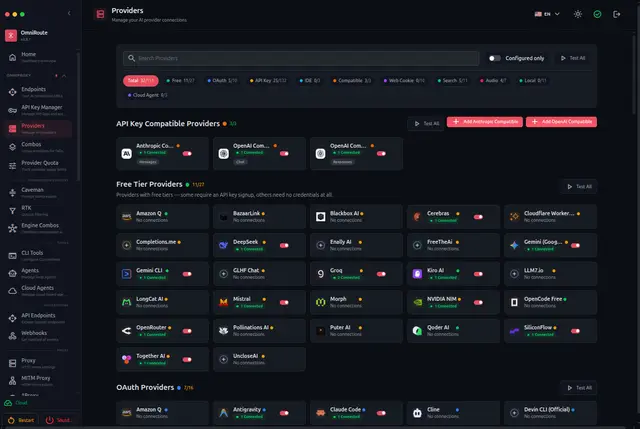
Provider Connection Management
Adds, tests and rotates keys for AI provider connections and shows their metrics.
Install
npx skills add cheaper-inference/OmniRoute --skill cli-providers -g -a claude-code -y- Repository
- cheaper-inference/OmniRoute83.6k
- Category
- AI and agents
- Updated
- 4d ago
- License
- MIT
- Context cost
- Mediumabout 2,106 tokens
- Runs scripts
- No, instructions only
What it does
Manage provider connections from the CLI: list available/configured providers, add, test, test-all, validate, rotate API keys, and view per-provider metrics.
Overview
Manage provider connections from the CLI: list available/configured providers, add, test, test-all, validate, rotate API keys, and view per-provider metrics.
Quick install
npm install -g omniroute   # or: npx omniroute
omniroute --version
Subcommands
provider-cmd provider [subcommand]
Manage provider connections (use
Example:
omniroute provider-cmd provider [subcommand]
providers
Example:
omniroute providers
providers available
Show available providers in the OmniRoute catalog
Flags:
--json--search <query>-q, --q <query>--category <category>
Example:
omniroute providers available
providers list
List configured provider connections
Flags:
--json
Example:
omniroute providers list
providers test <idOrName>
Test a configured provider connection
Flags:
--json
Example:
omniroute providers test <idOrName>
providers test-all
Test all active provider connections
Flags:
--json
Example:
omniroute providers test-all
providers validate
Validate local provider configuration without calling upstream
Flags:
--json
Example:
omniroute providers validate
providers rotate <idOrName>
Flags:
--new-key <key>--from-env <VAR>--oauth--yes--skip-test--dry-run
Example:
omniroute providers rotate <idOrName>
providers status
Flags:
--provider <name>--json
Example:
omniroute providers status
providers metrics
Flags:
--provider <id>--connection-id <id>--period <p>--metric <m>--sort-by <field>--limit <n>--watch--compare <list>
Example:
omniroute providers metrics




