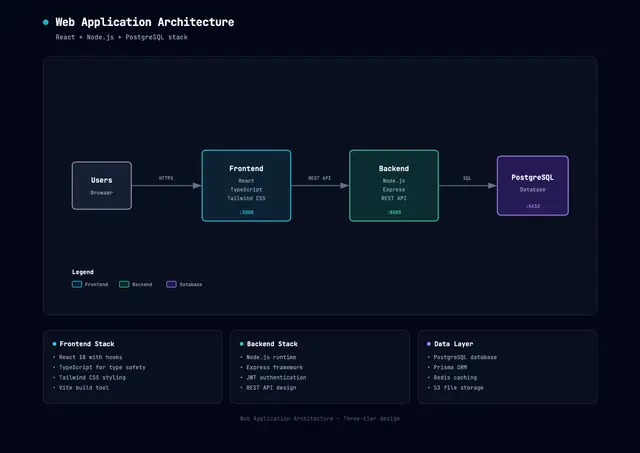
Architecture Diagram
Creates dark-themed architecture diagrams as self-contained HTML and SVG.
Install
npx skills add Cocoon-AI/architecture-diagram-generator --skill architecture-diagram -g -a claude-code -y- Repository
- Cocoon-AI/architecture-diagram-generator7.5k
- Category
- Design
- Updated
- 6mo ago
- License
- MIT
- Context cost
- Mediumabout 2,028 tokens
- Runs scripts
- No, instructions only
What it does
Create polished dark-themed architecture diagrams as self-contained HTML+SVG files. Use when the user asks for system, infrastructure, cloud, security, or network topology diagrams.
Architecture Diagram Skill
Create professional technical architecture diagrams as self-contained HTML files with inline SVG graphics and CSS styling.
Version 1.1 · MIT License · Authored by Cocoon AI
Design System
Color Palette
Use these semantic colors for component types:
| Component Type | Fill (rgba) | Stroke |
|---|---|---|
| Frontend | rgba(8, 51, 68, 0.4) | #22d3ee (cyan-400) |
| Backend | rgba(6, 78, 59, 0.4) | #34d399 (emerald-400) |
| Database | rgba(76, 29, 149, 0.4) | #a78bfa (violet-400) |
| AWS/Cloud | rgba(120, 53, 15, 0.3) | #fbbf24 (amber-400) |
| Security | rgba(136, 19, 55, 0.4) | #fb7185 (rose-400) |
| Message Bus | rgba(251, 146, 60, 0.3) | #fb923c (orange-400) |
| External/Generic | rgba(30, 41, 59, 0.5) | #94a3b8 (slate-400) |
Typography
Use JetBrains Mono for all text (monospace, technical aesthetic):
<link href="https://fonts.googleapis.com/css2?family=JetBrains+Mono:wght@400;500;600;700&display=swap" rel="stylesheet">
Font sizes: 12px for component names, 9px for sublabels, 8px for annotations, 7px for tiny labels.
Visual Elements
Background: #020617 (slate-950) with subtle grid pattern:
<pattern id="grid" width="40" height="40" patternUnits="userSpaceOnUse">
  <path d="M 40 0 L 0 0 0 40" fill="none" stroke="#1e293b" stroke-width="0.5"/>
</pattern>
Component boxes: Rounded rectangles (rx="6") with 1.5px stroke, semi-transparent fills.
Security groups: Dashed stroke (stroke-dasharray="4,4"), transparent fill, rose color.
Region boundaries: Larger dashed stroke (stroke-dasharray="8,4"), amber color, rx="12".
Arrows: Use SVG marker for arrowheads:
<marker id="arrowhead" markerWidth="10" markerHeight="7" refX="9" refY="3.5" orient="auto">
  <polygon points="0 0, 10 3.5, 0 7" fill="#64748b" />
</marker>





