Agenticx Tool Creator
Guide for creating custom tools in AgenticX including function decorator tools, MCP...
Install
npx skills add DemonDamon/AgenticX --skill agenticx-tool-creator -g -a claude-code -y- Repository
- DemonDamon/AgenticX866
- Category
- AI and agents
- Updated
- 3d ago
- License
- Apache-2.0
- Context cost
- Lightabout 876 tokens
- Runs scripts
- No, instructions only
What it does
Guide for creating custom tools in AgenticX including function decorator tools, MCP tool integration, tool registries, and remote tool access. Use when the user wants to create tools for agents, integrate external APIs as tools, build MCP servers, or extend agent capabilities with custom functions.
AgenticX Tool Creator
Guide for building tools that extend agent capabilities.
Tool Architecture
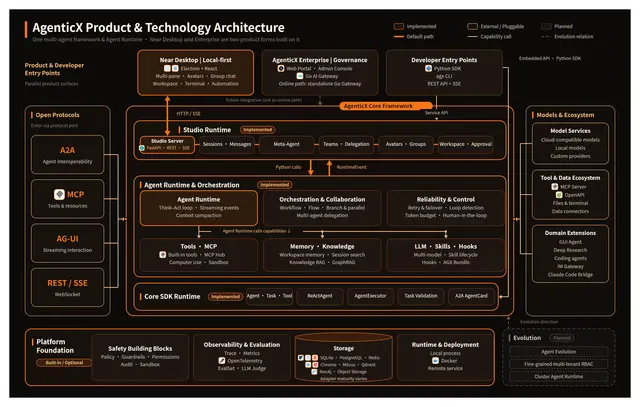
AgenticX tools inherit from BaseTool and are consumed by agents during execution. Three approaches exist:
- Function decorator (
@tool), fastest for simple tools - Class-based (extend
BaseTool), for complex or stateful tools - MCP remote tools, for external services via Model Context Protocol
Function Decorator Tools
from agenticx.tools import tool

@tool
def search_web(query: str) -> str:
    """Search the web for information.

    Args:
        query: The search query string.

    Returns:
        Search results as text.
    """
    # implementation
    return f"Results for: {query}"

@tool
def read_file(path: str) -> str:
    """Read contents of a local file."""
    with open(path) as f:
        return f.read()
The @tool decorator reads the function signature and docstring to generate the tool schema automatically. The docstring is the tool description the LLM sees.
Class-Based Tools
For tools needing initialization, state, or complex logic:
from agenticx.core import BaseTool

class DatabaseQuery(BaseTool):
    name = "database_query"
    description = "Query the project database."

    def __init__(self, connection_string: str):
        super().__init__()
        self.conn = connect(connection_string)

    def _run(self, sql: str) -> str:
        return self.conn.execute(sql).fetchall()
Tool Registry
Register and discover tools globally:
from agenticx.core import ToolRegistry

registry = ToolRegistry()
registry.register(search_web)
registry.register(read_file)

# List all registered tools
for t in registry.list_tools():
    print(f"{t.name}: {t.description}")
MCP Integration
AgenticX supports the Model Context Protocol for remote tool access.
Connecting to an MCP Server
from agenticx.protocols import MCPClient




