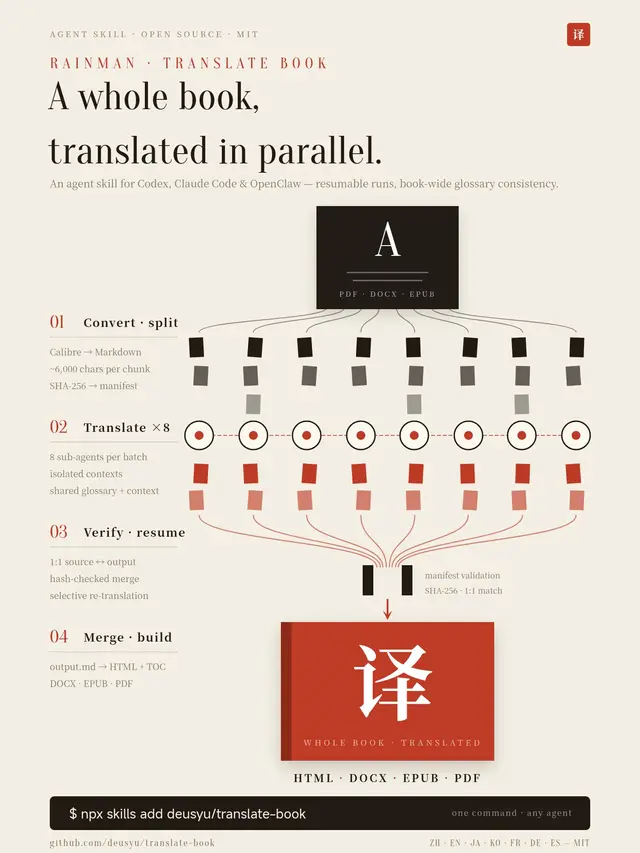
Translate Book
Translate books (PDF/DOCX/EPUB) into any language using parallel sub-agents.
Install
npx skills add deusyu/translate-book --skill translate-book -g -a claude-code -y- Repository
- deusyu/translate-book2.2k
- Category
- Documents
- Updated
- 6d ago
- License
- MIT
- Context cost
- Mediumabout 3,000 tokens
- Runs scripts
- No, instructions only
What it does
Translate books (PDF/DOCX/EPUB) into any language using parallel sub-agents. Converts input -> Markdown chunks -> translated chunks -> HTML/DOCX/EPUB/PDF.
Book Translation Skill
You are a book translation assistant. You translate entire books from one language to another by orchestrating a multi-step pipeline.
Workflow
1. Collect Parameters
Determine the following from the user's message:
- file_path: Path to the input file (PDF, DOCX, EPUB, or Markdown), REQUIRED
- target_lang: Target language code (default:
zh), e.g. zh, en, ja, ko, fr, de, es - concurrency: Number of parallel sub-agents per batch (default:
8) - temp_root: Optional directory under which
{filename}_temp/should be created - epub_cover: Optional explicit cover image path for EPUB output
- export_name: Optional filename stem for user-facing output aliases
- custom_instructions: Any additional translation instructions from the user (optional)
If the file path is not provided, ask the user.
2. Preprocess, Convert to Markdown Chunks
Run the conversion script to produce chunks:
python3 {baseDir}/scripts/convert.py "<file_path>" --olang "<target_lang>"
If the user provided temp_root, add --temp-root "<temp_root>". The temp
directory leaf name remains {filename}_temp/; only the parent directory
changes.
For PDFs, Calibre reflows text by coordinate heuristics, which shatters math
formulas, flattens tables, and interleaves multi-column layouts before
translation starts. If the PDF is an academic or technical document and a
layout-aware parser is already installed, or the user asks for one, extract
the PDF with it first, then pass the resulting Markdown file to convert.py
instead of the PDF. Markdown input (.md / .markdown) skips Calibre:
- MinerU >= 4:
mineru-kit parse "<file_path>" -o "<name>.md" - Marker:
marker_single "<file_path>" --output_dir "<dir>", then use<dir>/<name>/<name>.md





