Openstoryline Install
Install, configure, and start FireRed-OpenStoryline from source on a local machine.
Install
npx skills add FireRedTeam/FireRed-OpenStoryline --skill openstoryline-install -g -a claude-code -y- Repository
- FireRedTeam/FireRed-OpenStoryline3.6k
- Category
- AI and agents
- Updated
- 3mo ago
- License
- Apache-2.0
- Context cost
- Lightabout 1,400 tokens
- Runs scripts
- No, instructions only
What it does
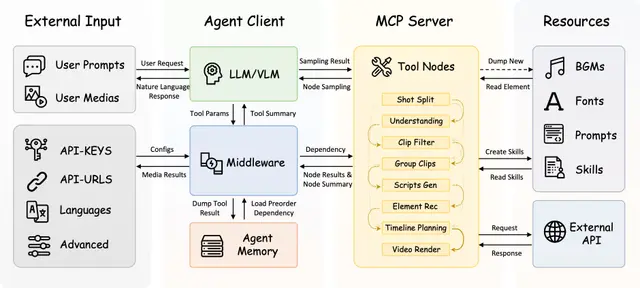
Install, configure, and start FireRed-OpenStoryline from source on a local machine. Use when a user asks to set up OpenStoryline, troubleshoot installation, download required resources, fill config.toml API keys, or launch the MCP and web services, as well as Chinese requests like “安装 OpenStoryline”, “配置 OpenStoryline”, “启动 OpenStoryline”, “把 OpenStoryline 跑起来”, “修复 OpenStoryline 安装问题”, or “排查 OpenStoryline 启动失败”.
OpenStoryline Install
Use this skill when the task is to install or repair a local source checkout of FireRed-OpenStoryline.
Keep the workflow deterministic:
- Confirm the repo path and read the current README.md and config.toml.
- Detect local prerequisites before changing anything.
- Prefer a local
venvinstall unless the user explicitly asks for Docker orconda. - Download resources only after Python dependencies succeed.
- Validate imports and config loading before claiming success.
- This skill assumes macOS, Linux, or WSL with a POSIX shell.
What This Skill Covers
- Clone the GitHub repo if needed
- Create a Python environment
- Install Python dependencies
- Download
.storylinemodels andresource/assets - Fill
config.tomlmodel settings - Start MCP and web servers
- Explain common installation/documentation gaps
Preconditions
Check these first:
git- Python
>= 3.11 ffmpegwgetunzip
Optional:
dockerconda
If ffmpeg, wget, or unzip are missing, install them through the OS package manager before continuing.
Examples:
-
macOS with Homebrew:
brew install ffmpeg wget unzip -
Debian/Ubuntu:
sudo apt-get update
sudo apt-get install -y ffmpeg wget unzip
If no supported package manager or permission is available, stop and report the missing system dependency clearly.
Interpreter selection
First prefer any interpreter that already exists and passes version checks:
- A system Python
>= 3.11 - An already available conda Python
>= 3.11 - An already available pyenv Python
>= 3.11, but only if basic stdlib modules work
Validate candidate interpreters before using them:
/path/to/python -c "import ssl, sqlite3, venv; print('stdlib_ok')"
If no supported interpreter already exists, peferr conda fallback:




