Floorplan
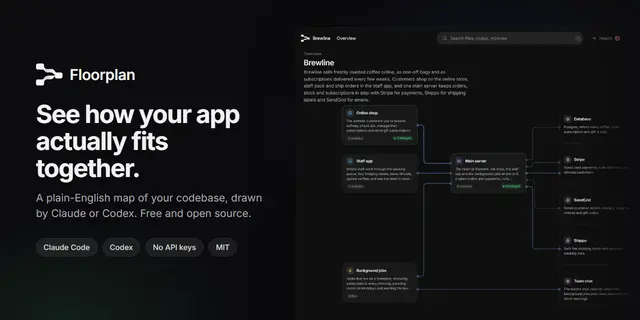
Draw a floorplan of an app's codebase (one repo or several side by side), an...
Install
npx skills add haydenschmitty/floorplan --skill floorplan -g -a claude-code -y- Repository
- haydenschmitty/floorplan1.6k
- Category
- Design
- Updated
- 3d ago
- License
- MIT
- Context cost
- Mediumabout 3,000 tokens
- Runs scripts
- Yes, review before use
What it does
Draw a floorplan of an app's codebase (one repo or several side by side), an interactive node-graph map where every subsystem, module, file and HTTP route has a human-readable name and a one-line description, connected by the imports and HTTP calls between them, at several zoom levels. It is saved as a self-contained floorplan/index.html in the codebase. Use whenever the user wants to visualize, map, diagram, document or get an architectural overview of a codebase, repo or monorepo, understand how their app works or is connected under the hood, onboard onto unfamiliar code, see how the frontend talks to the backend, or update an existing floorplan, even if they don't say "visualize". Also use it before any code exists: when the user shares a PRD, a spec or a description of something they want to build and asks what pieces it needs or how they'd fit together, it draws a blueprint, the same map planned from the document.
Floorplan
You produce floorplan/ at the codebase root: a floorplan of the app that someone new can read like a system diagram. Every card shows a human name and a one-line description, with the real path in small type underneath.
- You write:
architecture.json(subsystems, modules, flows) anddescriptions/*.json(a name and description for every file and route). - Generated:
graph.jsonandindex.html.
The scripts do the mechanical work: finding repos, parsing imports and routes, matching HTTP calls to endpoints, layout and rendering. Your job is the part only a reader of the code can do: deciding what things are and saying so plainly.
Existing map: !node ${CLAUDE_SKILL_DIR}/scripts/status.mjs || true
Arguments: $ARGUMENTS
In Codex (or any agent that left the two lines above unfilled): ${CLAUDE_SKILL_DIR} in every command here means this skill's folder, the one holding this SKILL.md, so use its path. Run node <that folder>/scripts/status.mjs from the codebase root yourself to see whether a map exists, and take the path and --refresh from the user's request. The scripts notice they're running under Codex, so the map's Ask bar and "Fix with" prompts use Codex.
Nothing built yet? Draw a blueprint
If the user wants to plan something they haven't built ("here's my PRD", "I want to build an app that…", a long description of a system), make a blueprint: the same map, planned from their document instead of scanned from code. Use this path when there's no code for the system yet, even if the folder holds other things. If the code exists, make a normal map.





