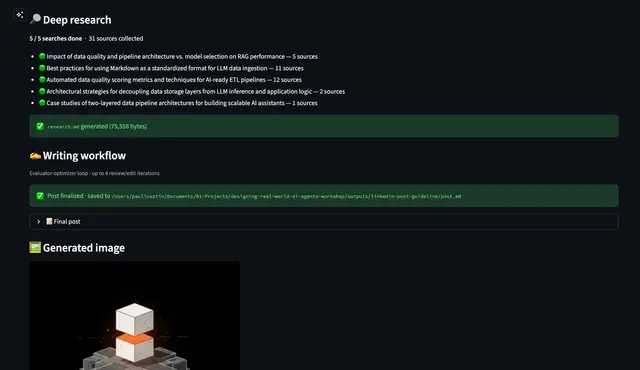
Research And Write
End-to-end workflow: research a topic and then write a LinkedIn post about it.
Install
npx skills add iusztinpaul/designing-real-world-ai-agents-workshop --skill research-and-write -g -a claude-code -y- Repository
- iusztinpaul/designing-real-world-ai-agents-workshop521
- Category
- Writing
- Updated
- 5mo ago
- License
- MIT
- Context cost
- Lightabout 519 tokens
- Runs scripts
- No, instructions only
What it does
End-to-end workflow: research a topic and then write a LinkedIn post about it. Use this skill whenever the user wants the full pipeline, from a topic idea to a finished LinkedIn post. Triggers on: 'research and write a post about', 'create a LinkedIn post about [topic]', 'I want to post about', 'write about [topic] for LinkedIn', or any request that implies both researching a subject and producing a LinkedIn post from it. This is the go-to skill when the user gives you a topic and expects a finished post.
Research and Write
End-to-end workflow: research a topic, then write a LinkedIn post from it. Chains the deep-research and linkedin-writer MCP servers.
Input Preparation
Gather from the user:
- Topic, what to research
- Guideline, how the post should be written (becomes
guideline.md)
If the user only gives a topic, ask for the guideline details (angle, audience, key points, tone) or suggest a default based on the topic.
Working Directory
All output goes into outputs/{slug}/ relative to the project root. Derive the slug from:
- The dataset seed/guideline filename if the user references one (e.g.,
my-topic_seed.md→my-topic) - Otherwise, slugify the topic (lowercase, hyphens, no special chars, max 60 chars)
Create the directory if it doesn't exist.
Create guideline.md in the working directory:
# LinkedIn Post Guideline

## Topic
[Core topic]

## Angle
[Perspective]

## Target Audience
[Who reads this]

## Key Points to Cover
[3-5 bullets]

## Tone
[How it should sound]
Execution
Phase 1: Research
Load the research_workflow MCP prompt from the deep-research server and follow the workflow instructions using the available tools:
deep_research, for web research queriesanalyze_youtube_video, for any YouTube URLs the user providescompile_research, to produce the final research.md
Use outputs/{slug}/ as the working_dir for all tool calls. This produces research.md.
Tell the user when research is complete.
Phase 2: Write
Read the WORKFLOW_INSTRUCTIONS from src/writing/routers/prompts.py and follow those steps exactly, using the linkedin-writer MCP tools. The working directory outputs/{slug}/ already has guideline.md and research.md from Phase 1.
The generate_post tool internally runs 4 evaluator-optimizer iterations (review + edit cycles) to refine the post before producing the final version.



