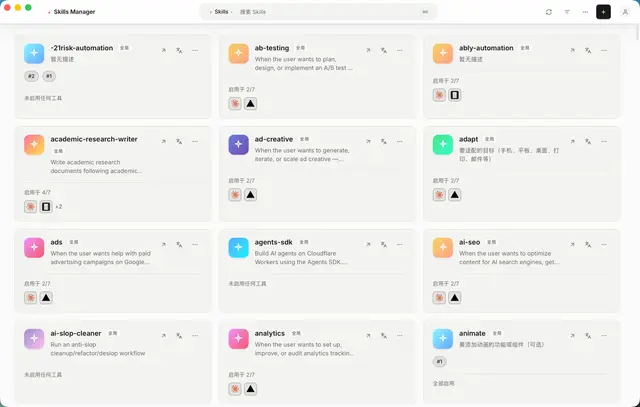
Skills Manager CLI
Drive the Skills Manager CLI (`skm`) to initialize the hub, adopt unmanaged skills...
Install
npx skills add jiweiyeah/Skills-Manager --skill skills-manager-cli -g -a claude-code -y- Repository
- jiweiyeah/Skills-Manager1.1k
- Category
- AI and agents
- Updated
- 2mo ago
- License
- MIT
- Context cost
- Mediumabout 2,507 tokens
- Runs scripts
- No, instructions only
What it does
Drive the Skills Manager CLI (`skm`) to initialize the hub, adopt unmanaged skills, list/enable/disable skills per AI tool, and doctor/fix symlink sync. Use whenever the user or an agent needs to manage skills from a terminal, SSH session, CI job, or headless machine; when a skill is missing in Claude Code, Codex, Cursor, Gemini, OpenCode, or any other supported tool; when asked to run skm / Skills Manager CLI; or when setting up Skills Manager without the GUI. Do not use for `npx skills` / skills.sh search (different CLI), for writing SKILL.md content (skill-creator), or for marketplace browse/install (not in skm).
Skills Manager CLI (skm)
New here? This skill drives skm, the command-line tool that ships with
Skills Manager, a desktop app
(macOS / Windows / Linux) that installs one copy of a skill into a central hub
and symlinks it into every AI coding tool you use (Claude Code, Codex, Cursor,
Gemini, and ~30 more), so you write a skill once and it shows up everywhere.
If you found this skill on ClawHub but don't have Skills Manager yet, that is
the missing piece: skm is not a standalone binary you npm install. Get it
by installing the app from the official website
(then Settings → Command Line Tool, or run skm init), or grab a
skm-<target>.tar.gz / .zip from the
GitHub Releases page.
Source and docs: https://github.com/jiweiyeah/skills-manager.
skm is the terminal front-end of Skills Manager. It reads and writes the
same ~/.skills-manager/config.json and the same hub/tool symlinks as the
desktop app, so GUI and CLI are interchangeable.
It does not create, edit, search, translate, tag, or marketplace-install
skills. Those stay in the GUI (or you write files into the hub yourself, then
skm enable).




