HTML Slide To PPTX
Convert structured single-slide or small deck HTML files into editable PPTX slides with...
Install
npx skills add mucsbr/ppt-agent-workflow-san --skill html-slide-to-pptx -g -a claude-code -y- Repository
- mucsbr/ppt-agent-workflow-san652
- Category
- Design
- Updated
- 2mo ago
- License
- See repository
- Context cost
- Lightabout 909 tokens
- Runs scripts
- Yes, review before use
What it does
Convert structured single-slide or small deck HTML files into editable PPTX slides with native text boxes, shapes, chips, arrows, and panels. Use when the user has an HTML slide/design draft and wants a high-fidelity editable PowerPoint instead of a screenshot-based export. Also use when the HTML does not fit an existing slide family and a new preset must be added before conversion. Especially useful for Gartner/analyst-style technical slides, architecture pages, AI runtime pages, and other fixed-layout HTML presentation pages.
html-slide-to-pptx
Convert structured HTML slides into editable PPTX by parsing semantic blocks and mapping them to native PowerPoint objects.
This skill is preset-driven.
- Reuse an existing preset when the HTML belongs to a supported slide family.
- Add a new preset when the HTML belongs to a new slide family.
- Do not promise arbitrary HTML/CSS fidelity.
First steps
- Read the incoming HTML and identify the slide family.
- If you are on a new machine, a fresh agent, or dependency state is unclear, read
references/setup.mdfirst. - Run
npm run check-envbefore first use on a new environment. - If dependencies are missing, run
npm ciornpm installin the skill directory.
Workflow
- Identify whether the HTML belongs to a supported preset.
- Parse the HTML into a small intermediate model instead of trying to render arbitrary CSS.
- Generate PPTX with native text/shapes using the bundled script.
- Run a QA/preflight review on the generated result or the extracted model.
- Open or preview the PPTX and inspect spacing, overflow, and arrow direction issues.
- Iterate the preset mapping when fidelity is not good enough.
Current support
Preset: v9-architecture
Use for this exact or near-exact structure:
- Header eyebrow + brand
- Title
- Core summary box
- Left driver panel
- Center layered architecture stack
- Right judgement chain panel
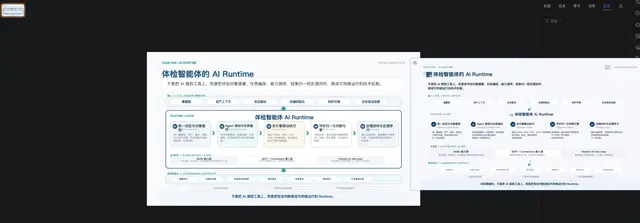
Preset: ai-runtime-page
Use for this exact or near-exact structure:
- Header eyebrow + brand
- Title + lead box
- Input chip row
- Main runtime box with 5 modules
- Support layer cards
- Output chip row
- Base layer + takeaway
Commands
Verify environment
npm run check-env
Convert HTML to PPTX
node scripts/html_to_pptx.js <input.html> <output.pptx> [--preset=v9-architecture|ai-runtime-page] [--dump-model <file.json>]





