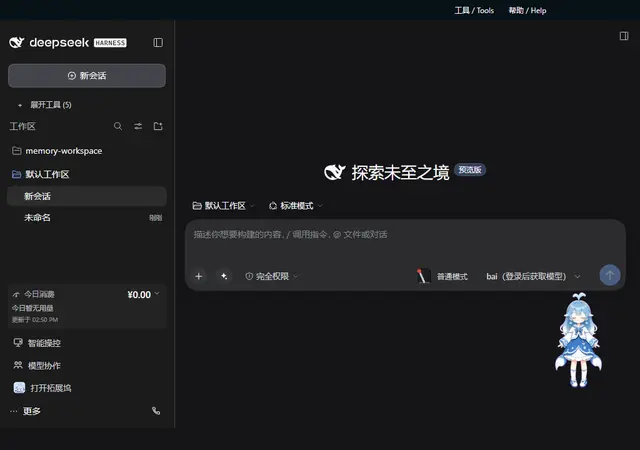
Skin Developer
Build a new skin for the dsh-web-ui skin collection (DSH Web GUI) and publish it into...
Install
npx skills add ningbainb/deepseek-harness-desktop --skill skin-developer -g -a claude-code -y- Repository
- ningbainb/deepseek-harness-desktop891
- Category
- Design
- Updated
- 5d ago
- License
- BSD-3-Clause
- Context cost
- Lightabout 1,173 tokens
- Runs scripts
- No, instructions only
What it does
Build a new skin for the dsh-web-ui skin collection (DSH Web GUI) and publish it into the skin-center plugin, scaffold with scripts/dsh-skin-new, author skin.json plus the apply/dispose + scoped-CSS contract, build and test with the official standalone bundle standard (turtle-ui shape), regenerate the skin-center registry and gallery, and submit the PR. Use when the user asks to create, add, develop, scaffold, or publish a new skin for the dsh web GUI skin collection.
皮肤开发者(dsh-web-ui 皮肤集合)
本技能指导在 /Users/zcl/code/dsh-web-ui(或任何 dsh-web-ui 克隆)里从零构建一个新皮肤,
并把它发布进 skin-center 插件(GUI 设置页 Skins 分区)与 gallery。每个皮肤是符合 DSH
官方插件标准(turtle-ui 式 setup)的自包含包,可被 dsh plugin add 安装。
仓库与标准速览
packages/skins/<name>/, 一个皮肤 = 一个自包含插件包;packages/skins/qq98/是成熟样例,遇到疑问先读它。- 官方标准四件套(对照 DSH
docs/user/develop/basic/publish.md,turtle-ui 为范例):package.json声明dsh.bundle.patch→cordis.patch.yml(安装时自动插入ui-skin-*dshClient 行);cordis.patch.yml, bundle patch 层;prepare脚本 =tsdown(pnpm 在 git 安装后自动运行,自包含构建lib/,无项目引用、无类型检查);- devDependencies 只用真实发布版本(tsdown / lightningcss / cordis / vitest / jsdom), ,
@deepseek-ai/dsh-*未发布到 npm,运行时由宿主 shell 的 module table 提供,构建时作 external。
- 构建预设:
packages/skins/tsdown.client.ts(官方packages/client/tsdown.client.ts的 standalone 移植)。 - 仓库是 pnpm workspace:根目录
pnpm install一次即可构建/测试全部皮肤。
0. 前置
cd <dsh-web-ui 克隆根>
pnpm install        # 首次;顺带跑每个皮肤的 prepare
先读 packages/skins/qq98/ 的 src/client/index.ts 与 skin.json,理解 apply 契约与元数据契约。
1. 脚手架
node scripts/dsh-skin-new <kebab-case-name> # 如 matrix、coffee-break
生成 packages/skins/<name>/:package.json(官方标准)、cordis.patch.yml、tsdown.config.ts、
tsconfig.json、skin.json(order 自动取最大值+1)、src/index.ts(无操作 host 入口)、
src/client/index.ts(最小 apply 模板)、<name>.module.css(作用域样式)、tests/apply.spec.ts
(契约测试)、README.md。随后按脚本打印的 next steps 填写。





