Vss Generate Video Report
Use this skill when producing a VSS analysis report, Mode A per-clip VLM, Mode B...
Install
npx skills add NVIDIA-AI-Blueprints/video-search-and-summarization --skill vss-generate-video-report -g -a claude-code -y- Category
- Media
- Updated
- 4d ago
- License
- Apache-2.0
- Context cost
- Mediumabout 3,000 tokens
- Runs scripts
- No, instructions only
What it does
Use this skill when producing a VSS analysis report, Mode A per-clip VLM, Mode B incident-range via video-analytics, Mode C SOP compliance via the SOP tools. Not for standalone video summarization, real-time alerts or ad-hoc Q&A.
Report
When to Use
- Generate a per-clip VLM video analysis report (Mode A)
- Generate a narrative report over an incident/alert time range (Mode B)
- Generate an SOP compliance report via the SOP tools (Mode C)
Not for standalone video summarization, real-time alerts, or ad-hoc Q&A.
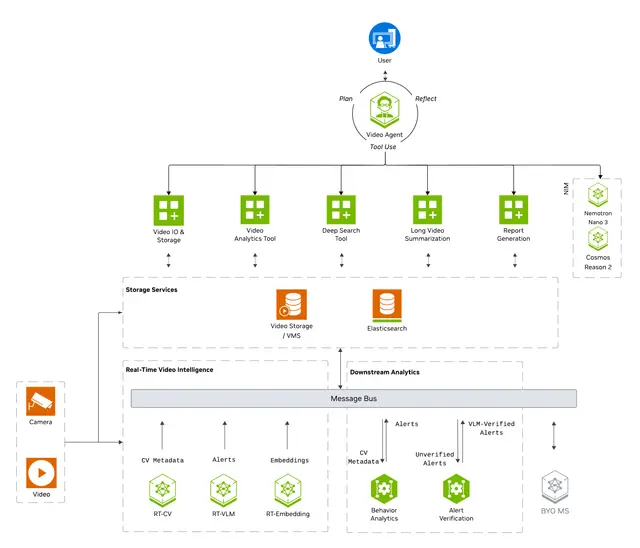
Generate a video analysis report by routing to one of three backends, never via POST /generate on the VSS agent.
| Mode | Backend | Steps |
|---|---|---|
| A. Video clip | A1 /vss-manage-video-io-storage → clip URL → VLM chat/completions OR A2 local video file on disk or base64 video + a VLM endpoint (caller-supplied or Step 2-discovered) | references/report-types/video-analysis.md |
| B. Incident range | /vss-query-analytics → incident list → narrative report | references/report-types/incident-range.md |
| C. SOP compliance | VA-MCP get_sop_report (direct MCP call on ${VA_MCP_URL}) → SOP compliance report | references/report-types/sop-compliance.md |
If the request is ambiguous (e.g. "report on <sensor>" with no time range and no incident wording), default to Mode A. Ask only when the request names a sensor and a time range and carries neither incident / alert wording (→ Mode B) nor SOP / compliance wording (→ Mode C). Never run any mode's probe or gate until the mode is settled. See Examples below for the request phrasings that route to each mode.





