Vss Setup Video Analytics API
Use to deploy the vss-video-analytics-api REST service standalone with its...
Install
npx skills add NVIDIA-AI-Blueprints/video-search-and-summarization --skill vss-setup-video-analytics-api -g -a claude-code -y- Category
- DevOps
- Updated
- 4d ago
- License
- Apache-2.0
- Context cost
- Mediumabout 2,428 tokens
- Runs scripts
- No, instructions only
What it does
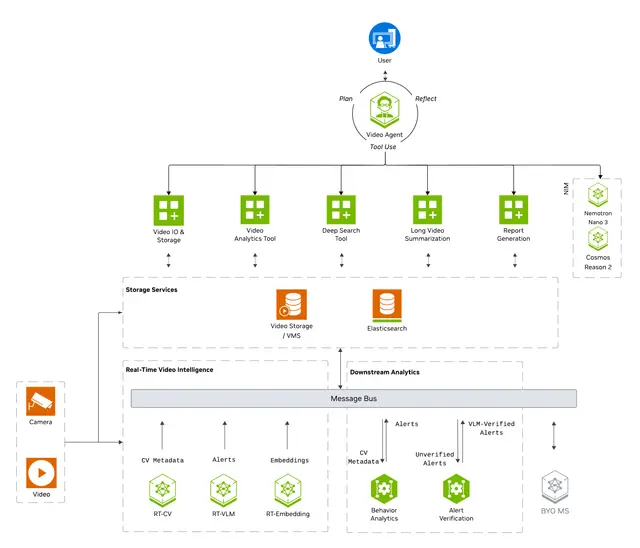
Use to deploy the vss-video-analytics-api REST service standalone with its Elasticsearch ingest-pipeline, selectable Kafka/Redis stream type, and Kafka-topic readiness gates when Kafka is selected. Not for full warehouse deploy.
Purpose
Deploy the video-analytics-api REST service standalone with the user's chosen config and data-log bind. The service exposes port 8081 and /livez only after Elasticsearch, the insertion-timestamp-pipeline, and, when STREAM_TYPE=kafka, the configured Kafka topic requirements are ready.
Instructions
Follow the routing tables and step-by-step workflows below. Each section that ends in workflow, quick start, or flow is intended to be executed top-to-bottom. Detailed reference material lives in references/.
Examples
Worked end-to-end examples are kept under evals/ (each *.json manifest
contains a runnable scenario). Run a Tier-3 evaluation to replay them:
nv-base validate skills/deployment/vss-setup-video-analytics-api --agent-eval
A minimal standalone bring-up looks like:
cd $REPO/deploy/docker
export VSS_APPS_DIR=$(pwd)
export VSS_DATA_DIR=${VSS_DATA_DIR:-/tmp/vss-data}
mkdir -p "$VSS_DATA_DIR/data_log/vss_video_analytics_api"
docker compose -f services/analytics/video-analytics-api/compose.yml up -d vss-video-analytics-api
curl -sf http://localhost:8081/livez
Follow references/deploy-video-analytics-api-service.md for the full
workflow (config source, data-log bind, infrastructure dependencies, REST endpoints).
For the field-by-field JSON config reference, see references/configuration.md.
Limitations
- Requires the matching VSS profile / microservice to be deployed and reachable from the caller.
- NGC-hosted models and NIMs may be subject to rate-limits, GPU memory requirements, and license restrictions.
- Concurrency, GPU memory, and storage limits depend on the host hardware and the profile's compose file.




