App Store Screenshots
Builds App Store and Play screenshot pages and exportable marketing images.
Install
npx skills add ParthJadhav/app-store-screenshots --skill app-store-screenshots -g -a claude-code -y- Repository
- ParthJadhav/app-store-screenshots7.8k
- Category
- Mobile
- Updated
- 19d ago
- License
- MIT
- Context cost
- Mediumabout 3,000 tokens
- Runs scripts
- Yes, review before use
What it does
Use when building App Store or Google Play screenshot pages, generating exportable marketing screenshots for iOS, macOS, and/or Android apps, or scaffolding a screenshot editor with Next.js. Triggers on app store, mac app store, play store, screenshots, marketing assets, html-to-image, phone mockup, mac mockup, android screenshots, feature graphic.
App Store & Google Play Screenshots Generator
Overview
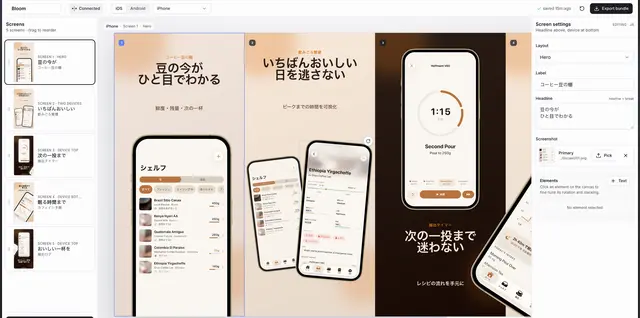
Scaffold a pre-built Next.js + ShadCN editor that lets the user design and export App Store and Google Play screenshots as advertisements (not UI showcases). The editor handles all the heavy lifting:
- Connected live preview at the canvas's true resolution (scaled to fit)
- Drag-to-reorder screens, inline text editing, layout switcher per screen
- Cross-screen mockups: phone/device frames, captions, and layered elements can be moved across adjacent screens, then exported as clipped crops
- Drop-target screenshot picker (file → saved to
public/screenshots/uploaded/<hash>.png) - Auto-save to
app-store-screenshots.jsonat the project root (git-trackable) +localStoragemirror - Easy iOS ↔ Mac ↔ Android platform switch, separate slide decks live side by side
- One-click bulk PNG export at every Apple/Google-required resolution via
html-to-image - Light/dark variant toggle per slide, a toolbar theme picker (one palette preset per named style), locale select
- A Copy ideas menu next to the headline field with formulas for hero, differentiator, feature, proof, and closer slides
- Per-slide custom background colors (caption colours stay readable automatically), a live screenshot font menu, and importing licensed WOFF2/WOFF/TTF/OTF fonts
- Image overlay elements (logos, badges, photos) with drag/resize/rotation/layering controls and directional edge fades
- Toolbar Undo/Redo (
⌘Z/⇧⌘Z) over the last 50 edits of the session - Guided in-place migration for older projects created by this skill; passive and explicit migrations keep legacy decks isolated until the user intentionally opts into connected canvas



