Claude Smart
Codex-only, use when the user asks to run claude-smart commands in Codex, including...
Install
npx skills add ReflexioAI/claude-smart --skill claude-smart -g -a claude-code -y- Repository
- ReflexioAI/claude-smart790
- Category
- AI and agents
- Updated
- 5d ago
- License
- Apache-2.0
- Context cost
- Lightabout 415 tokens
- Runs scripts
- No, instructions only
What it does
Codex-only, use when the user asks to run claude-smart commands in Codex, including claude-smart show, learn, restart, dashboard, clear-all, or slash-like requests such as /claude-smart:learn. In Claude Code the native plugin slash commands handle these; do not invoke this skill there.
claude-smart Commands In Codex
Codex does not currently support plugin-provided slash commands. When the user
asks for a claude-smart command, run the equivalent shell command through the
active plugin root. This skill is Codex-specific; under Claude Code the native
/claude-smart:* slash commands already exist, so do not fall back to the
shell commands there.
Command Map
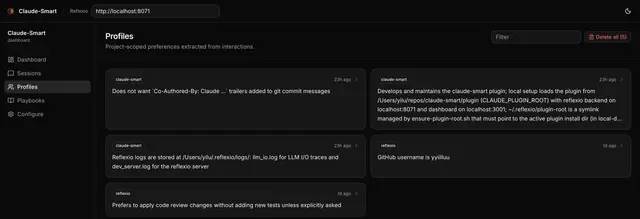
- Dashboard:
bash ~/.reflexio/plugin-root/scripts/dashboard-open.sh - Load the full text of an injected learning:
bash ~/.reflexio/plugin-root/scripts/cli.sh load --session <session-id> <id>(the injected index header gives the exact command) - Show learned state:
bash ~/.reflexio/plugin-root/scripts/cli.sh show - Learn from the latest turn:
bash ~/.reflexio/plugin-root/scripts/cli.sh learn - Learn with a note:
bash ~/.reflexio/plugin-root/scripts/cli.sh learn --note "<note>" - Restart backend/dashboard:
bash ~/.reflexio/plugin-root/scripts/cli.sh restart - Clear all learned state:
bash ~/.reflexio/plugin-root/scripts/cli.sh clear-all --yes
Behavior
- Treat slash-like prompts such as
/claude-smart:showas requests to run the matching shell command above. - For
learn, preserve any user-provided note exactly as the note text. - For
clear-all, require explicit confirmation before running it because it deletes all reflexio interactions, preferences, and skills. - If
~/.reflexio/plugin-rootis missing or broken, rerunnpx claude-smart install --host codexto repair installation, then tell the user to start a new Codex session and rerun the command. - After running a command, summarize the important output concisely.




