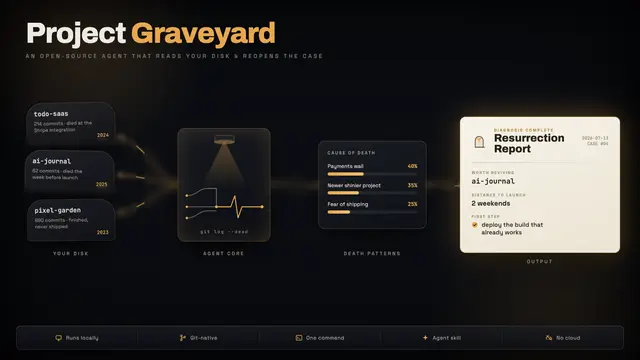
Project Graveyard
Autopsy abandoned side projects from git history and pick one worth finishing.
Install
npx skills add Shubhamsaboo/awesome-llm-apps --skill project-graveyard -g -a claude-code -y- Repository
- Shubhamsaboo/awesome-llm-apps144k
- Category
- Business
- Updated
- 13d ago
- License
- Apache-2.0
- Context cost
- Mediumabout 2,453 tokens
- Runs scripts
- Yes, review before use
What it does
Scans the developer's machine for dead side projects, autopsies each one from its git history (died at the payments wall, killed by a newer project, finished but never shipped), surfaces their personal death patterns, and picks the corpse most worth resurrecting, then helps ship it. Use when the user mentions abandoned, unfinished, or old side projects, asks "what should I finish", wants to revive or resurrect a project, says "run the graveyard", wonders why they never finish anything, or is about to start a new project that sounds like one they already built. Runs entirely locally.
Project Graveyard
Every developer has a folder full of dead projects. Nobody has ever gotten an autopsy report. This skill scans the machine for abandoned repos, works out why each one died from its git history, finds the user's personal death patterns, and picks the one corpse worth digging up, then helps ship it.
Everything runs locally. No API, no network, nothing leaves the machine.
When to use
- The user asks about abandoned/unfinished/old side projects, or what to finish
- The user wants to revive, resurrect, or "finally ship" something
- The user asks why they never finish projects
- The user proposes a new project, check the graveyard first (see Necromancer mode). There's a decent chance they already built half of it.
When not to use
- Cleaning up disk space or node_modules, that's
kondo/npkill, not this - Archiving repos on GitHub, this works on local clones and never-pushed work
- Analyzing one specific repo's history in depth, just read the git log
Run it
python3 scripts/graveyard.py ~/dev ~/projects
Point it at wherever projects actually live. If you don't know where that is, ask, one question beats sweeping someone's home directory uninvited. No args scans the usual suspects (~/dev, ~/projects, ~/code, ~/Desktop, ...). Useful flags:
--days 90, how long silent before a repo counts as dead (default 45)--json report.json, full machine-readable data--me work@email.com, claim commits made under other emails (repeatable); without it, projects committed via a work identity or a builder tool get skipped as "not yours"--include-foreign, also include repos the user barely committed to (skipped by default: clones, forks, work checkouts are not their corpses)--state FILE, remember scans and resurrections; enables relapse watch
The script is read-only. It never writes inside a scanned repo.





