SkyPilot
Launches GPU and CPU training and inference jobs across clouds and Kubernetes.
Install
npx skills add skypilot-org/skypilot --skill skypilot -g -a claude-code -y- Repository
- skypilot-org/skypilot10.8k
- Category
- DevOps
- Updated
- 3d ago
- License
- Apache-2.0
- Context cost
- Mediumabout 3,000 tokens
- Runs scripts
- No, instructions only
What it does
Use when launching cloud VMs, Kubernetes pods, or Slurm jobs for GPU/TPU/CPU workloads, training or fine-tuning models on cloud GPUs, deploying inference servers (vllm, TGI, etc.) with autoscaling, writing or debugging SkyPilot task YAML files, using spot/preemptible instances for cost savings, comparing GPU prices across clouds, managing compute across 25+ clouds, Kubernetes, Slurm, and on-prem clusters with failover between them, troubleshooting resource availability or SkyPilot errors, optimizing cost and GPU availability, or migrating an existing Slurm workload (converting sbatch scripts, salloc sessions, job arrays or srun invocations into SkyPilot task YAMLs, and mapping Slurm commands, directives and SLURM_* environment variables to their SkyPilot equivalents).
SkyPilot Skill
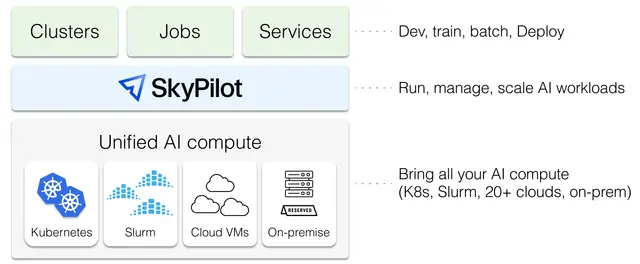
SkyPilot is a unified framework to run AI workloads on any cloud, Slurm or Kubernetes. It provides a single interface to launch clusters, run jobs, and serve models across 25+ clouds (AWS, GCP, Azure, Coreweave, Nebius, Lambda, Together AI, RunPod, and more), Kubernetes clusters, and Slurm clusters.
When to Use SkyPilot
Use SkyPilot when you need to:
- Manage compute resources on any cloud, Slurm, or Kubernetes cluster
- Launch CPU/GPU/TPU (GB300, GB200, B200, H200, H100, etc.) on any cloud, Kubernetes or Slurm
- Run training, fine-tuning, or batch inference jobs
- Serve models with autoscaling and multi-cloud replicas (SkyServe)
- Run long-running jobs with automatic lifecycle management and recovery (managed jobs)
- Find the cheapest or most available GPU across clouds
Don't use SkyPilot for:
- Local-only workloads (use Docker/conda directly)
Capabilities: When to Use What
SkyPilot has three core abstractions. Use the right one for each stage of your workflow:
1. SkyPilot Clusters (sky launch / sky exec), Interactive development and debugging
- Use during initial development, debugging, and experimentation
- Launch a cluster, SSH in or connect VSCode/Cursor (
code --remote ssh-remote+CLUSTER), iterate quickly - Cluster stays up until you stop/down it or autostop triggers
- Best for: prototyping, debugging, short experiments
2. Managed Jobs (sky jobs launch), Long-running training and batch jobs
- Use when submitting long-running jobs that should run unattended
- Manages the full lifecycle: provisioning, execution, recovery, and teardown
- Automatically recovers from spot preemptions, quota limits, and transient failures
- Works across clouds, Kubernetes, and Slurm (handles preemptions and quota)
- Best for: training runs, fine-tuning, hyperparameter sweeps, batch inference




