Workspace Authoring
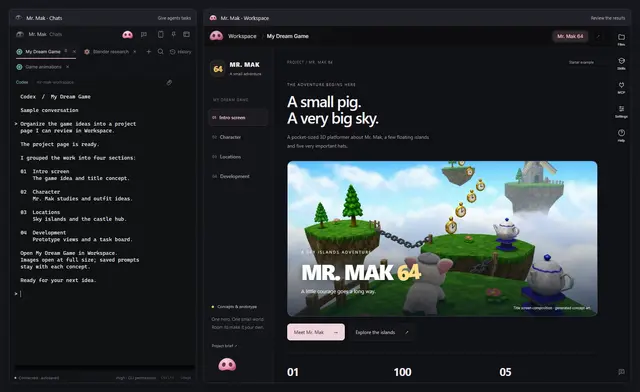
Create or maintain Workspace cards, report tabs and Markdown deliverables with...
Install
npx skills add witnesstodark/mr-mak-workspace --skill workspace-authoring -g -a claude-code -y- Repository
- witnesstodark/mr-mak-workspace642
- Category
- Engineering
- Updated
- 5d ago
- License
- MIT
- Context cost
- Lightabout 775 tokens
- Runs scripts
- No, instructions only
What it does
Create or maintain Workspace cards, report tabs and Markdown deliverables with consistent styling, working media previews and clear project organization.
Workspace authoring
Read AGENTS.md and the workflow.
Keep authored content in English unless the user explicitly requests another
language. Put related iterations in an existing card rather than creating
several cards for one task. Do not reorganize unrelated projects.
For a gallery or research page that the owner wants to edit directly, use the
versioned .card.json format in editable cards.
Register its step with viewer: "card". Keep stable entry IDs, relative local
images and Markdown notes; validate with desktop/service/card-schema.mjs before
saving. Reread the source before each edit and update the registry date. The app
provides the view, so do not create a second editable HTML copy of the same data.
Preserve existing custom HTML unless conversion was requested. Browser and phone
previews can read these cards; the desktop Workspace provides editing controls.
Use workspace/_shared/report.css and report.js in every HTML report, with
data-mak-report="document" on the root element. Use the shared tokens and
layout instead of inventing another visual theme. Basic cards and media grids
can use the sample CSS in workspace/_shared/examples.css.
Standard reports follow the reader's Dark, Light or System preference. Check
both dark and light when adding custom styles. An intentionally independent
design, such as a game demo, can keep its palette with data-mak-theme="custom"
on the root element. Do not invert or recolor media to implement a theme.
Every image must be clickable, preview at full size and offer a download. Use local output paths, meaningful alt text and lazy loading. Keep motion studies playable with native video controls. Wide tables must scroll within the report. Never cover the document close button with the Files rail.



