Manage Skills
Installs, removes and deploys shared agent skills per agent.
Install
npx skills add xingkongliang/skills-manager --skill manage-skills -g -a claude-code -y- Repository
- xingkongliang/skills-manager7.1k
- Category
- AI and agents
- Updated
- 4d ago
- License
- MIT
- Context cost
- Mediumabout 3,000 tokens
- Runs scripts
- No, instructions only
What it does
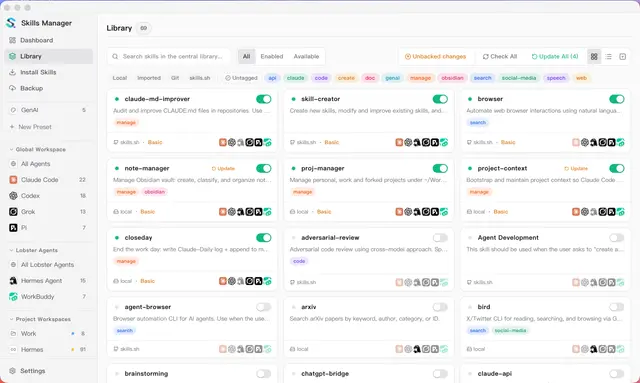
Manage the user's shared agent-skill library via skills-manager-cli, install, update, remove, deploy or undeploy skills per agent, manage presets, organize tags, search, and adopt existing skills. Use this whenever the user wants Claude Code, Codex, Cursor, or another agent to gain or lose a skill, wants to organize the central library, or asks what is installed or deployed. Prefer this over direct agent-folder installs because Skills Manager preserves source metadata, preset membership, updates, and cross-agent deployment state.
Before doing anything
-
Resolve the CLI first, then use the path it prints. Run this once (POSIX shell):
D="$HOME/.skills-manager/bin"
B="$D/skills-manager-cli"; [ -e "$B" ] || B="$B.exe"   # .exe on Windows
if [ -s "$D/.version" ] && [ -x "$B" ]; then
  echo "$B"
elif [ -s "$D/.version" ] || [ -e "$B" ]; then
  echo BRIDGE_BROKEN
else
  P="$(command -v skills-manager-cli 2>/dev/null || true)"
  [ -x "$P" ] && echo "$P"
fi
Substitute the printed path into every command below, wherever the examples write
$SM. Do not carry$SMas a shell variable: each command you run is a new shell, so an assignment made here is gone by the next one.The three outcomes:
- A path under
~/.skills-manager/bin, the desktop app published this copy, and the.versionstamp appears only after it has been verified, so it always matches the app the user is running. Use it. BRIDGE_BROKEN, something the app left behind is here but does not add up: an unstamped binary, or a stamp with no binary beside it. Either is what a copy that failed half-way leaves. Stop. Do not go looking for another CLI: that binary may predate a safety fix, and the machine has a desktop app whose version nothing here can match. Ask the user to open the Skills Manager app once, which republishes it.- A path from PATH, nothing was ever published here, so there is no stale copy to worry about: this is a CLI-only machine (a server install, a standalone download, a hand-built binary). Use it, but note it can be older than a desktop app if one is also installed.
- A path under




