AI Listening
Collect what is new in AI in the last 24 hours across X, Hugging Face, GitHub and...
Install
npx skills add zhuyansen/new-term-radar --skill ai-listening -g -a claude-code -y- Repository
- zhuyansen/new-term-radar2k
- Category
- Git and review
- Updated
- 7d ago
- License
- MIT
- Context cost
- Lightabout 1,255 tokens
- Runs scripts
- No, instructions only
What it does
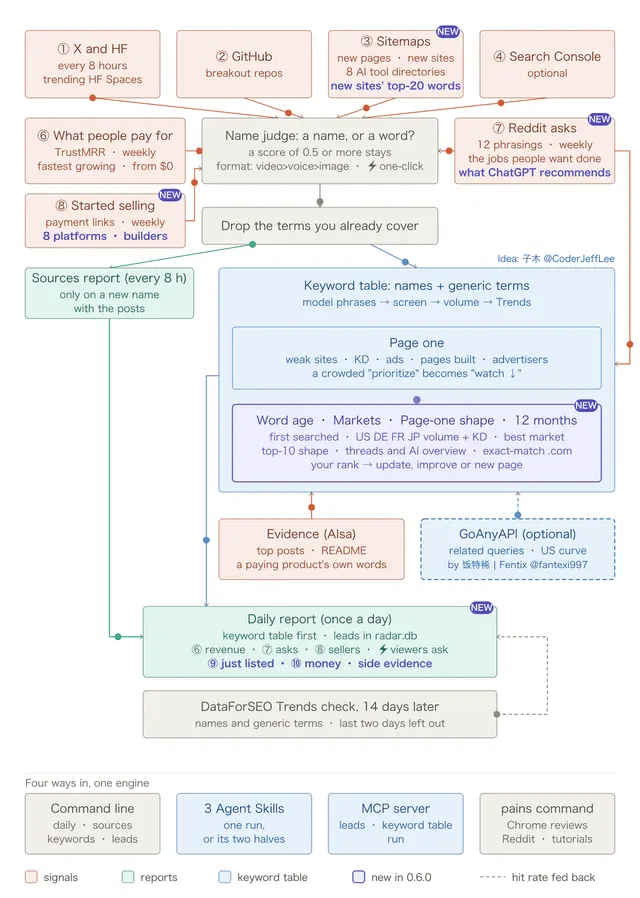
Collect what is new in AI in the last 24 hours across X, Hugging Face, GitHub and sitemaps, deduplicated, as one report of names that are starting to surge. Use when the user asks what is new or trending in AI today, wants a daily AI listening report, or needs fresh names of models, products and repositories to feed keyword research. Runs the new-term-radar command line; needs an AISA_API_KEY.
AI listening
Produce one report: the names of new AI models, products and repositories seen in the last 24 hours, where each was seen, and how strong the signal is. This is collection, not analysis. For search demand behind a name, hand the names to the seo-new-keywords-research skill.
Before you run anything
- Run the pinned release, never a clone of the repository:
uvx new-term-radar==0.6.1 <command> …(uv fetches that version from PyPI into a throwaway environment; it needs Python 3.10 or newer and nothing else). Without uv:python3 -m pip install new-term-radar==0.6.1, thennew-term-radar <command> …. - Run every command from one working directory, so yesterday's snapshots are there today:
$NEW_TERM_RADAR_DIRif set, else~/new-term-radar(create it if it is missing). - Check an AIsa key is available:
AISA_API_KEY, or the AIsa CLI logged in (ls ~/.aisa/key). Without one, only the free signals run (Hugging Face, GitHub, sitemaps), no X posts are read, and nothing judges which terms are names. Say so in the report. A key comes from https://go.aisa.one/yansen-zhu. - With no
config.jsonin that directory the radar runs on the example list of X accounts and sitemaps it ships with, and says so. Tell the user, and that aconfig.jsonwritten there replaces it (the example to start from: https://github.com/zhuyansen/new-term-radar/blob/v0.6.0/config.example.json).
Cost and time: say it, then wait for a yes
A run reads every X account in config.json: about 0.003 USD and 10 seconds each, so the example list of 35 accounts is about 0.11 USD and 6 minutes. sources costs the same. Tell the user the estimate and run only after they say yes: a request for the report is not a yes to the cost. Do not run it twice in a row: the second run reports only what changed since the first. leads is free.
Run
uvx new-term-radar==0.6.1 daily --skip usecases,review,newsites,tutorials,asks,sellers,revenue --out listening.md




